Claude Design Hands-On Review: Anthropic's Prototyping Tool (2026)
 Dmytro Chaban
Anthropic shipped Claude Design on April 17, 2026, and I spent the same afternoon pointing it at a throwaway landing-page mock to see if it survives contact with an actual prototyping session. Short answer: this is not the "prompt-to-HTML toy" I expected. It's the first AI design surface I've used that actually behaves like a designer iterating with you. It asks real design questions, stacks them so you're never blocked, and negotiates direction before committing. Still preview-grade, still rough in places. But the ambition is much bigger than the launch coverage made it sound.
TL;DR#
- What it is: Anthropic's research-preview design collaborator. Prompts, sketches, and documents in; editable HTML prototypes, slides, and marketing assets out.
- Model: runs on Claude Opus 4.7, the same model I covered in the Opus 4.7 vs 4.6 migration piece.
- Availability: research preview on Claude Pro, Max, Team, and Enterprise. No free tier.
- Biggest surprise: batched review requests. Claude Design asks real design questions (icons, font sizes, logo treatment, layout), stacks them so you're never blocked waiting on one answer, and lets you negotiate direction before it commits. This is the first AI design tool that feels like pairing with a designer, not prompting a model.
- Biggest win: deep design-system linking (vision, codebase, assets) plus the same connector ecosystem as Claude Code and Artifacts. Jira, GitHub, Google Drive are all available on day one.
- Biggest miss: visibly preview-grade. Anthropic labels it that way, and the friction shows in minor UI jank and the rare misread annotation.
- Bottom line: this is a real step up, not an incremental release. If you're a designer or founder, try it today. Not a Lovable replacement, not a developer replacement, but a genuinely new surface for design work.
What Is Claude Design?#
Claude Design is Anthropic's research-preview tool for turning natural-language prompts, sketches, and documents into editable HTML prototypes, slides, and marketing assets. It launched on April 17, 2026, runs on Claude Opus 4.7, and is available to Claude Pro, Max, Team, and Enterprise subscribers. You describe what you want, Claude produces a first version on a persistent canvas, and you refine by chatting, editing inline, drawing on top of the rendered page, or nudging presets in a Tweaks panel.
Positioning-wise, Claude Design sits between Claude Artifacts (single-file, chat-driven, regenerate-to-change) and full-stack builders like Lovable or v0. Anthropic's own framing lists six use cases: prototypes, wireframes, design explorations, pitch decks, marketing collateral, and what they call "frontier design" (code-powered prototypes with voice, video, shaders, and 3D).
Hands-On: Prototyping a Landing Page#
For this session, I threw a generic, throwaway landing-page mock at Claude Design. No real product, no client. Just a pretend SaaS with a hero, a feature grid, and a CTA. The goal was to see how it feels in practice, not to ship anything.
The Input Flow#
The input surface is what you'd expect: a prompt box, a way to attach documents, and a way to upload a sketch. I gave it something like:
"Prototype a clean, minimal landing page for a small SaaS tool. Hero with a headline and a CTA, a three-column feature grid below, and a pricing section. Calm, modern, lots of white space."
You can pair that with a PDF brief, a hand-drawn mockup, or existing design docs. Anthropic's pitch is that it will also read your codebase and design files to pull in brand colors, typography, and components. I didn't wire that in for a throwaway session, but it's the most interesting enterprise angle in the announcement.
First generation came back quickly. Not stopwatch-fast, but fast enough that the wait never became a pain point.
What Claude Design Actually Produces#
The output is a full, editable HTML page sitting on a persistent canvas. Every element is editable in place: text, layout, images, spacing. That's the critical break from Claude Artifacts, where the unit of work is "regenerate the artifact" rather than "edit this headline." Here you click the headline, you change the headline, you move on.
It also does the thing you hope it does. The page looks like a real landing page, not a Bootstrap starter. Typography is considered, spacing is intentional, the CTA is where it should be. Close to what I'd call a reasonable v0 first draft, visually.
Editing the Output: Inline and Draw-on-Top#
Two editing modes matter here.
Inline edits are the obvious one. Click text, type, done. Move a section, resize an image, adjust padding. No chat round-trip.
Draw-on-top is the more interesting one. You annotate the rendered page directly: cross out a section you want removed, circle a CTA you want emphasized, draw an arrow to indicate "move this here". Claude reads the annotation and applies the change. When it works, it removes the thing I hate most about prompting Claude Artifacts: the "regenerate the entire file to nudge one button" tax.
When it doesn't work, it's usually because my annotation was ambiguous. The fix is either re-draw or fall back to a text instruction. It's not magic. But it's the first editing flow that actually feels like design iteration, not prompt engineering.
The Tweaks Panel: Non-Chat Iteration#
Here's the part I didn't see coming from the announcement reading, and the part nobody else is writing about clearly.
Claude Design has a Tweaks panel: a side panel with preset controls that let you iterate without prompting the model. The point is to short-circuit the chat-regenerate loop for the 80% of small adjustments you'd otherwise waste tokens on.
Palette Variants#
The palette control proposes a handful of color treatments for the current design. You click through them, the page re-skins, you pick one. No prompt, no conversation, no "can you try a slightly warmer palette" exchange.
Title Variants#
Same pattern for copy. It proposes a few alternative headlines and you pick. It feels less like prompting and more like scrolling a set of curated completions.
Other Tweak Controls#
There are adaptive sliders and a few other preset knobs. Engadget's coverage calls these "adaptive sliders for adjusting specific design elements." I didn't stress-test them in a short session, but the pattern is the same: pick-from-options UX instead of type-a-prompt UX.
What Works Well#
Batched Review Requests: It Actually Behaves Like a Designer#
This is the feature that changed my read on Claude Design from "neat prototyping surface" to "this is a real step forward." When you give it a direction, it doesn't just blindly generate and hand you a finished page. It asks questions back. Concrete, specific design questions: "what's the logo treatment?", "what icon style fits your brand, outlined or filled?", "what's the base font size?", "where do you want the CTA emphasis to land?", "any existing code blocks or components I should respect?". Real designer questions, not a vague "anything else you want to add?".
And the questions are stacked, not sequential. You're not blocked waiting on one approval before it moves on. It accumulates a batch of review requests, keeps working in parallel, and then surfaces them together for you to review all at once. You approve, you disapprove, you negotiate ("no, that's not our palette, rework it"), and it goes back and incorporates the feedback before committing.
That flow is the whole difference between prompting a model and collaborating with one. Every other AI design tool I've used treats the human as an instruction source. Claude Design treats the human as an approver, which is what you actually are when you're shipping design work. The batched-review pattern also scales. The more complex the project, the more questions pile up, and you handle them when you have time instead of context-switching on every micro-decision.
If this holds up across longer projects, it's the feature that separates Claude Design from every prompt-to-UI tool in the space.
Speed From Napkin to Shareable Prototype#
The whole loop (prompt, first render, inline edits, palette tweak, title tweak) is fast enough that a solo operator can land on a shareable prototype in one sitting. For a pitch deck or a stakeholder-review mock, that's the whole job.
Editable HTML, Not a Black Box#
Output is real HTML. You can export it, open it in a browser, and hand it to a developer. Claude Artifacts can produce HTML too, but there the unit is a one-shot artifact. Here it's a canvas you iterate on. Artifacts is great for "show me something once." Claude Design is better for anything you'll touch twice.
Team Comments (per Anthropic's Docs)#
The announcement calls out multi-reviewer comments on the design. I didn't test this in my session, so I'm reporting it from Anthropic's docs, not firsthand. If it lives up to the pitch, it's the feature that makes Claude Design genuinely collaborative rather than a solo-prototyping toy.
Design System Linking Goes Deeper Than Colors#
This is the feature I'm most interested in, and it's bigger than the announcement makes it sound. You're not just handing Claude Design a palette and calling it done. You can link a whole design-system context: your company's visual language, what the company actually does, the vibe you want, your brand voice, plus image assets, a code repository it can read to infer patterns and components, and the design files it should treat as the source of truth. Point it at your codebase and it will explore real component patterns (spacing, typography scale, layout primitives) instead of reconstructing them from scratch every time.
That turns the onboarding step from a "theme picker" into something closer to a small internal brand agent. Canva, Brilliant, and Datadog are named as beta customers in the announcement, which tracks. This is the feature that separates "another AI design tool" from "a tool companies can actually adopt."
And critically, you can create multiple design systems, one per project. This was the question I was most uncertain about when I started writing, and the answer moves the feature from "interesting" to "I'm sold." If you juggle several projects with different brands (agency work, multiple products, client engagements), each one gets its own isolated design system. No leakage, no cross-contamination. Your branding isn't something you patch in with prompts on every generation; it's deeply understood by the tool, and everything it produces in that project comes out branded the way you need it. That's a real step change from "AI tool with a palette picker."
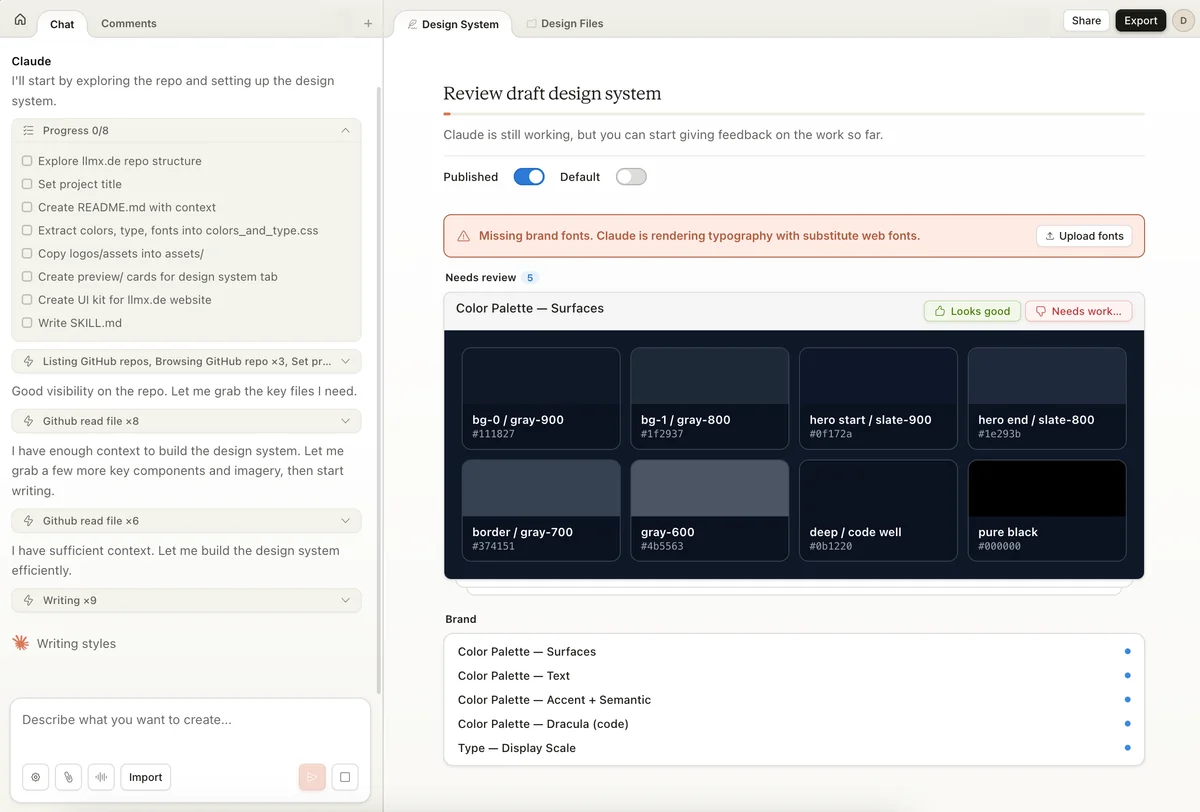
The image above is a good example of what the review flow actually looks like. Claude Design builds a draft design system from what you've given it, shows you the inferred palette with exact hex codes, and flags what's missing (in this case, the brand fonts it couldn't confidently pick). This is exactly the "ask, don't assume" pattern I covered earlier, applied to the design system itself.
Plugs Into the Same Connector Ecosystem as the Rest of Claude#
This is the part that makes Claude Design feel less like a standalone product and more like another surface on top of the Claude platform. The same connectors you already wire into Claude (Jira, Atlassian, Google Drive, GitHub, and the rest of the MCP-era integrations) are available here too. Pull a PRD out of Confluence, reference a Jira ticket, point it at assets in Google Drive, or let it read a GitHub repo for components. You don't re-authenticate, you don't rebuild context, and you don't maintain a separate source of truth per surface.
Practically, most of what you can already do in Claude Code, in Artifacts, or in Claude Co-work, you can do here as well. Just with a design canvas as the output target instead of a chat or a commit. If you're already on a Claude plan with connectors configured, Claude Design inherits them on day one, which is a real speed-up versus spinning up a new tool and re-plumbing the same integrations.
What's Rough: The Preview Honesty Section#
Anthropic is calling Claude Design a research preview on purpose. That label is doing real work.
Preview-Grade Feel#
Nothing in my short session broke catastrophically, but the surface has the rough edges you'd expect from a week-one release: minor layout hiccups and occasional jank that you recognize instantly if you've used other Anthropic Labs previews. I didn't hit a bug worth quoting. I also wouldn't plan a client demo on a one-shot Claude Design output without at least one cleanup pass.
What I'd Want Before Production Use#
- Reliability of draw-on-top interpretation on longer sessions. I did a short run; a multi-hour iteration would tell a different story.
- Behavior of the design-system ingestion on a real codebase at scale, not a toy project.
- Export fidelity across targets. PDF, PPTX, Canva, and HTML are all listed, but I only touched HTML. The others need a real test before I'd trust them.
This is a living review. I'm still actively evaluating Claude Design against a proper project, not just a throwaway mock. I'll update this piece as I test the design-system linking, multi-project behavior, team comments, and the other export targets. If you want the updates without checking back, drop your email below and I'll send them when they land.
Stay ahead of the curve
Find out which LLM is cheapest for your use case — I test new models as they launch
If you're evaluating for actual work, budget a full afternoon of stress-testing before you commit.
Claude Design vs Claude Artifacts#
This is the most important question for anyone already on a Claude Pro plan, and nobody is answering it clearly in the launch coverage.
- Claude Artifacts is a single-file surface inside a chat. You ask Claude to make something, it regenerates the artifact, you ask again. Good for throwaway one-shots and anything conversational.
- Claude Design is a persistent canvas with direct editing, draw-on-top, and the Tweaks panel. Good for anything you'll iterate on more than twice.
If you were already using Artifacts to build landing-page mocks, Claude Design is the upgrade. If you were using Artifacts to answer a one-off question with a visual, stay in Artifacts. The canvas is overkill for that.
Claude Design vs Lovable#
The "vs Lovable" comparison is the obvious one, but it's also the wrong framing. Lovable and Claude Design solve overlapping but different problems.
| Dimension | Claude Design | Lovable |
|---|---|---|
| Output | Editable HTML canvas, slides, marketing assets | Full-stack web app with frontend + backend |
| Editing model | Inline + draw-on-top + Tweaks panel | Visual edits + chat + code regen |
| Backend / data | None | Supabase + auth + storage built in |
| Production-readiness | Prototype / stakeholder review | Deployable app |
| Access tier | Claude Pro / Max / Team / Enterprise | Lovable subscription (separate) |
| Best for | Founders, designers, marketing | Founders shipping MVPs, non-technical builders |
Takeaway: they're complementary, not competing. Claude Design gets you to a shareable mock fast. Lovable gets you to a working app. If you're routing your work through both, use Claude Design for the prototype and Lovable when you actually need auth and a database.
Who Should Use Claude Design (and Who Shouldn't)#
Designers Evaluating AI Prototyping#
Use it for: early exploration, style variants, quick stakeholder mocks, getting out of the "first draft" rut. The Tweaks panel is a real time-save when you just want to see three palette options.
Skip it for: production handoff. Stay in Figma for anything that will land in a real design system or a front-end repo.
Founders and Solo Operators#
Use it for: landing-page prototypes, pitch decks, marketing mocks, anything where you need a plausible visual artifact and don't have a designer. This is the clearest win for Claude Design today. The editable HTML plus Tweaks panel means you can ship a usable prototype without a design hire.
Skip it for: anything that needs a real backend. Claude Design produces a static artifact. If the thing has to actually work, you want Lovable or a developer.
Engineers Building Production Apps#
This isn't the tool for you. For production code you want an agent, not a canvas. See the Claude Code setup guide for the right loop.
How to Get Access: Pro, Max, Team, Enterprise#
Claude Design is a research preview included with Claude Pro, Max, Team, and Enterprise subscriptions at launch. There's no standalone price and no free tier. If you already pay for Claude Pro ($20/month), you already have it.
If you're deciding between Claude plans, I wrote a longer breakdown in the Best Value LLM Subscriptions 2026 guide. Short version: Pro is enough for most solo operators, Max is worth it once you're using Opus 4.7 daily, Team and Enterprise are where the design-system ingestion feature actually earns its keep.
Verdict: Is Claude Design Worth It?#
Worth it if:
- You already pay for Claude Pro or higher and want to prototype without leaving the Anthropic ecosystem.
- You're a founder or solo operator who needs shareable visual artifacts without hiring a designer.
- You're a designer who wants a faster "first draft" surface before opening Figma.
- You liked Claude Artifacts for visuals and are tired of regenerating the whole file to move a button.
Not worth it if:
- You need a production backend. Use Lovable or build it properly.
- You need Figma-grade fidelity for handoff to a front-end team. Stay in Figma.
- You're expecting a polished, bug-free experience on day one. This is a research preview and it shows.
Bigger picture: AI tooling keeps collapsing the marketing-to-product pipeline, and Claude Design is the first surface I've seen that credibly handles the full design side of that pipeline. The batched-review flow, the design-system linking, and the shared connector ecosystem together make it feel less like "Claude gains a canvas" and more like Anthropic just shipped a design collaborator. Single-operator ownership of design + copy + layout stops being a slide in a pitch deck and starts being something you can actually sit down and do.
I'll use it the next time I need a prototype, and honestly, I'll probably use it for more than prototypes. I still wouldn't bet a client launch on it in its current preview state. But I'd bet on the trajectory.
Frequently Asked Questions
Related reading#
- Claude Opus 4.7 vs 4.6: Migration Review — the model that powers Claude Design, with breaking-change notes.
- How to Set Up Claude Code (2026) — Anthropic's other flagship tool, configured for shipping code.
- Best Value LLM Subscriptions 2026 — which Claude plan unlocks Claude Design without overpaying.
- Live LLM API Pricing — current Claude Opus 4.7 API rates.
Written by
AI engineer writing about agentic systems, MCP integration, and LLM comparisons. 10+ years building production software, 4+ focused on AI.
About Dmytro →Enjoyed this post?
Find out which LLM is cheapest for your use case — I test new models as they launch
No spam, unsubscribe anytime.